Skip To Main Content
nriaasthi.com - Your property | Our Service
Open Navigation
Workflow coverage map

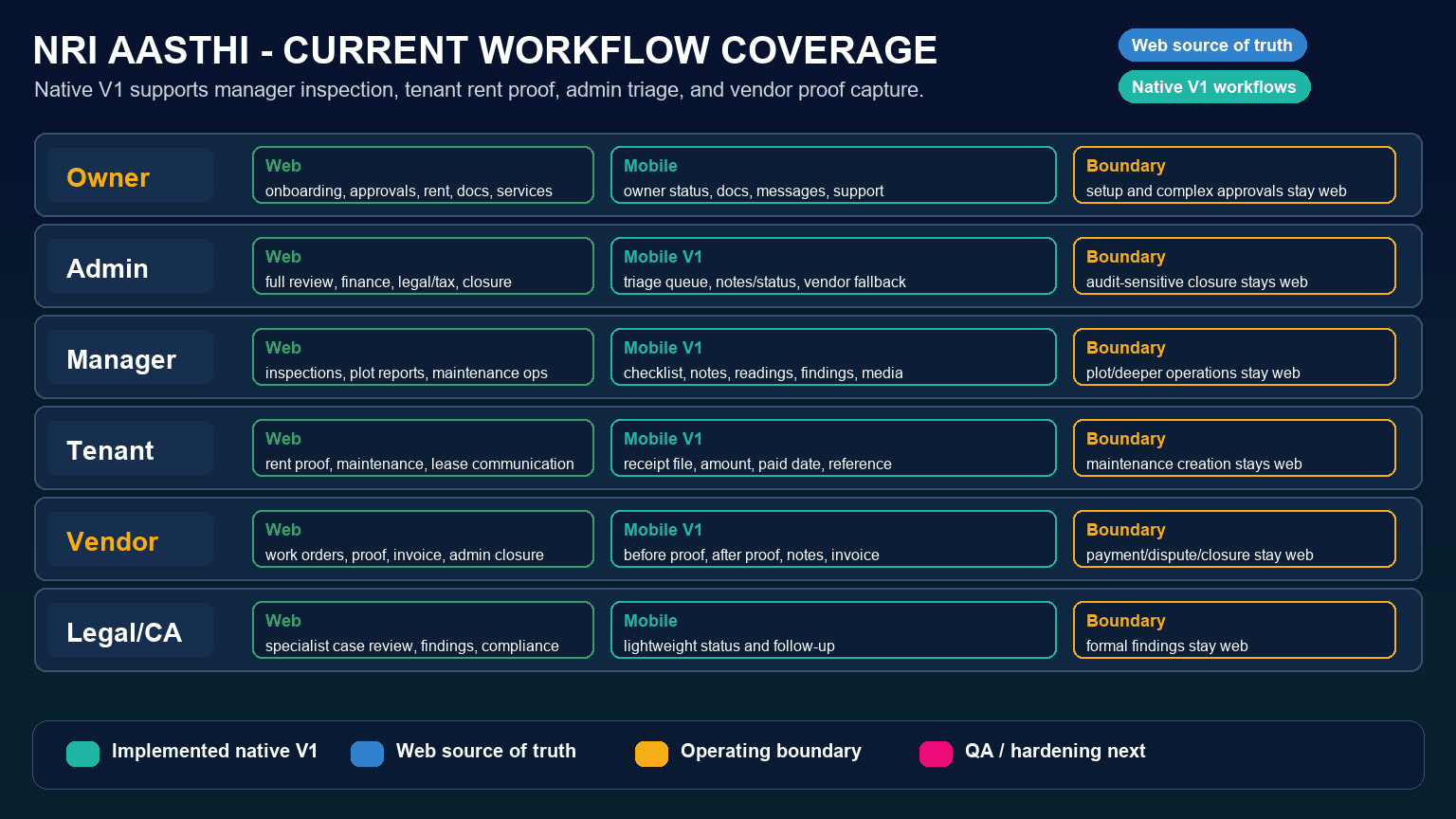
End-to-end workflow map by user type.

See how owners, admins, property managers, tenants, vendors, and Legal/CA partners enter the system, what they can do on web, what exists on native mobile, and which operating boundaries remain.

AI-generated swimlane workflow map showing NRI Aasthi owner, admin, manager, tenant, vendor, and Legal/CA role flows
Role journeys

Registration, web visibility, mobile visibility, and operating boundary.

This section is the maintainable source of truth. The diagrams are visual aids; the role-by-role text below should drive delivery and QA scope.

Owner / Co-owner

Medium
Registration
Owner is invited or signs up, completes identity and property intake, uploads required documents, and waits for admin review.
Web
Dashboard, properties, required documents, services, approvals, maintenance, inspections, rent, messages, notifications, and support.
Mobile
Owner-style property, services, documents, messages, notifications, support, and selected Legal/CA handling.
Boundary
Full onboarding, complex document correction, and detailed approval review remain web-led.

Admin / Super Admin

Critical
Registration
Super admin or admin account is provisioned with privileged role access and operational ownership.
Web
Full review portals for properties, owners, vendors, services, documents, maintenance, inspections, rent, notifications, and audit workflows.
Mobile
Native Admin/Super Admin has a lightweight triage queue, safe exception note/status updates, and vendor profile fallback.
Boundary
Full admin review, financial verification, legal/tax decisions, destructive actions, and detailed workflow closure remain web-first.

Property Manager

High
Registration
Admin assigns manager access, properties, field tasks, inspection scope, and escalation rules.
Web
Manager dashboard for assigned properties, inspections, maintenance follow-up, plot reports, and local execution notes.
Mobile
Native manager inspection submission captures checklist, room notes, meter readings, findings, risk, recommendations, and media. Native plot monitoring captures field conditions, risk, escalation, and four-corner media.
Boundary
Deeper maintenance updates and broader manager operations still rely on web.

Tenant

High
Registration
Admin creates or invites tenant, links lease and property, and enables rent and maintenance workflows.
Web
Tenant dashboard for rent proof, maintenance requests, service communication, lease context, and notifications.
Mobile
Native tenant rent proof upload supports file selection, amount, paid date, and payment reference. Native tenant maintenance creation supports issue type, room or area, priority, availability, emergency flag, and optional issue proof.
Boundary
Full repair follow-up, quote decisions, and rejected proof correction workflows remain web-first.

Vendor

High
Registration
Admin creates vendor profile, trade or specialty, contact details, verification status, and service assignment rules.
Web
Vendor work orders, assignment review, status updates, completion proof, invoice details, and admin closure.
Mobile
Native vendor work orders support before proof, after proof with completion notes, and optional invoice upload.
Boundary
Payment verification, dispute handling, and final operational closure remain web-first.

Legal/CA Partner

Medium
Registration
Admin provisions specialist access, assigns cases, and links legal, tax, compliance, or document review context.
Web
Legal/CA dashboard for assigned matters, findings, document notes, owner consent needs, and admin handoff.
Mobile
Some native Legal/CA handling exists, but the full web case surface is not mirrored.
Boundary
Native coverage should be hardened after the higher-volume owner, manager, tenant, and vendor workflows.
Web vs mobile heat map

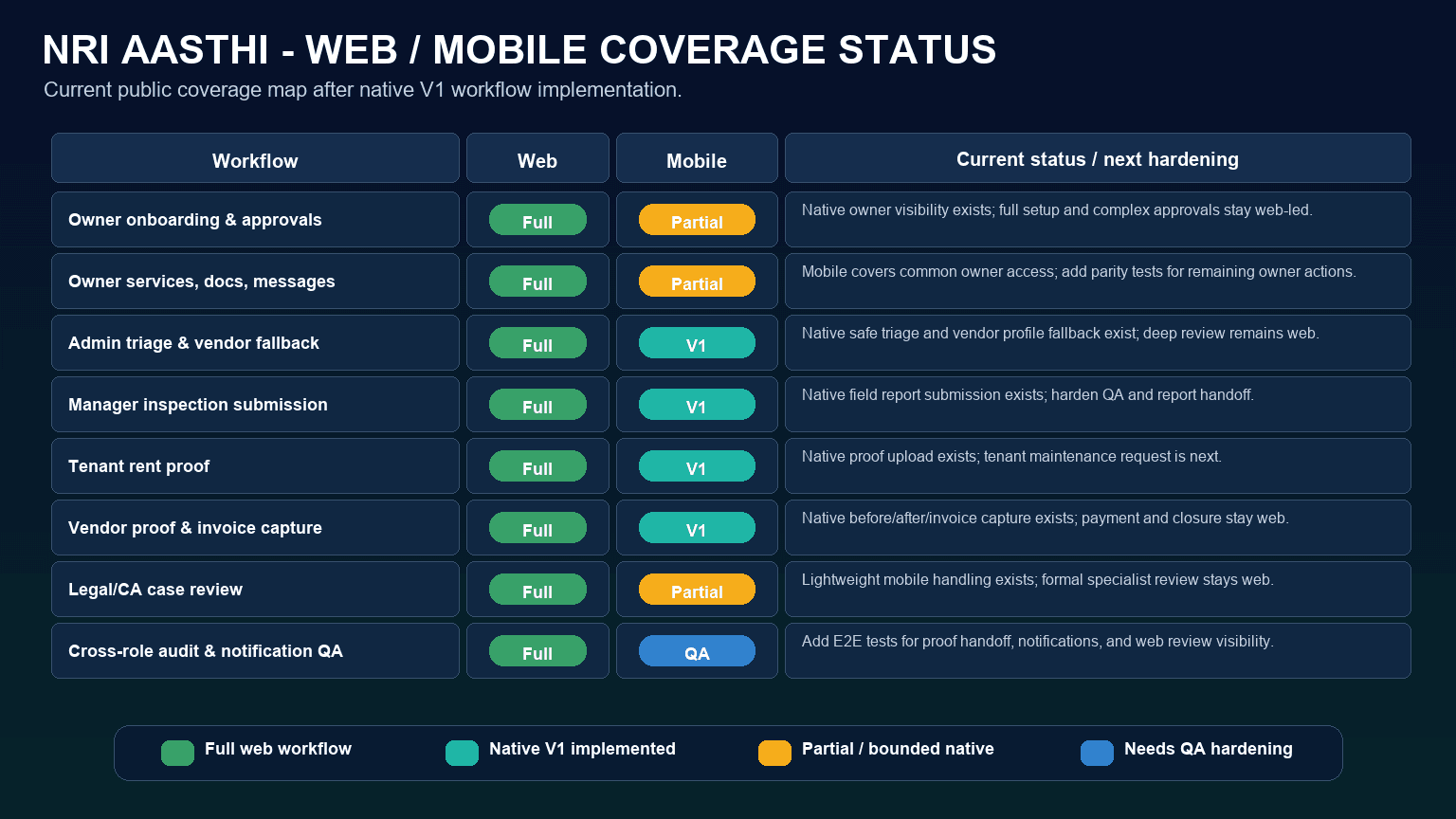
Coverage is strongest on web, with native V1 field workflows expanding.

Native mobile now covers selected high-volume owner, manager, tenant, vendor, and admin fallback actions. Web remains the source of truth for deep review, financial verification, legal decisions, and final operational closure.

AI-generated heat map comparing NRI Aasthi web and mobile role coverage
Workflow
Web
Mobile
Next action

Owner registration and property onboarding

Creates the property record and required document trail.

Full
Partial
Mirror property setup, status, and re-upload decisions in native owner UX.

Owner services, documents, messages, and support

Keeps remote owners informed and able to approve work.

Full
Partial
Close remaining owner parity work with mobile-specific acceptance tests.

Admin property, vendor, and workflow review

Controls quality gates before work reaches owners.

Full
Partial
Harden native triage and vendor fallback while keeping deep review and closure on web.

Property manager inspection submission

Turns field visits into auditable reports and repair decisions.

Full
Partial
Harden native inspection and plot monitoring QA, including four-corner media and owner notification checks.

Tenant rent proof and maintenance request

Reduces rent reconciliation and repair communication delay.

Full
Partial
Harden native rent proof and tenant maintenance creation QA, then add richer repair follow-up states.

Vendor work completion proof

Provides before/after evidence, invoice details, and closure confidence.

Full
Partial
Harden upload retry and web review handoff while closure and payment remain web-first.

Legal/CA case review

Routes document, tax, and compliance exceptions with specialist notes.

Full
Partial
Define which case actions truly need mobile versus web-only specialist review.

Cross-role audit, notification, and QA evidence

Explains who did what, when, and with which proof.

Full
Needs QA
Add end-to-end tests for mobile role notifications and proof handoff.

Delivery hardening

Remaining hardening work for end-to-end parity.

The highest-value mobile submissions are now represented as V1 workflows. The next work is to prove them through QA, clarify web-first boundaries, and add the remaining mobile-native actions.

P0

Native workflow QA hardening

Add end-to-end checks for manager inspections, manager plot monitoring, tenant rent proof, tenant maintenance creation, admin triage, and vendor proof handoff across Android, iOS, and web review.

P0

Marketplace native browsing and inquiry

Public marketplace remains web-only; web now supports residential and commercial rent, lease, and sale listings with commercial, stilt/cellar, and Indian preference filters. Define native browsing, listing detail, and inquiry capture when marketplace traffic justifies mobile coverage.

P1

Owner mobile onboarding parity

Owner can complete setup, track review status, handle re-upload requests, and see pending admin decisions.

P1

Admin deep review boundaries

Define which admin exception actions can safely stay native and which financial, legal, document, or closure actions must stay web-only.

P1

Property manager plot monitoring hardening

Harden native plot monitoring capture with four-corner media, escalation QA, owner notification checks, and web review handoff.

P2

Legal/CA action definition

Separate specialist actions that require mobile from deeper case review that can remain web-only.

Recommended sequence

Build parity through vertical role slices.

Each slice should include route access, form submission, media or document upload, notification, admin review, and owner-visible audit status.

  1. 1Document every current web role portal as the source of truth.
  2. 2Add role switching, permissions, and test users to native QA plans.
  3. 3Harden property manager inspection and plot monitoring capture with native QA and web report handoff checks.
  4. 4Harden tenant rent proof upload and tenant maintenance creation across native and web review.
  5. 5Harden vendor before/after proof and invoice upload with retry and web review checks.
  6. 6Keep admin deep review web-first while improving lightweight native exception triage.

Use for product planning

Convert the hardening backlog into role-specific issues with acceptance criteria and demo accounts.

Use for QA coverage

Create web and native end-to-end tests for every table row before declaring parity.

Use for customer clarity

Explain which workflows are available natively and which controls remain web-first.

Remote Owner, Local Clarity

Start with a free consultation, then choose the exact property workflow you need.